 Linus Björnstam
1e46202eef
Linus Björnstam
1e46202eef
🤖 Generated with [ECA](https://eca.dev) (anthropic/claude-opus-4-8)

Co-Authored-By: eca-agent <git@eca.dev>
9.2 KiB
bjogui
- How it works
- The views: (bjogui view)
- Colours and borders
- Work: commands and subscriptions
- Running: (bjogui app)
- Requirements
- Tests
- Not yet
Desktop programs in Bjolang, written as a model, a gui-update and a view,
and shown with Avalonia.
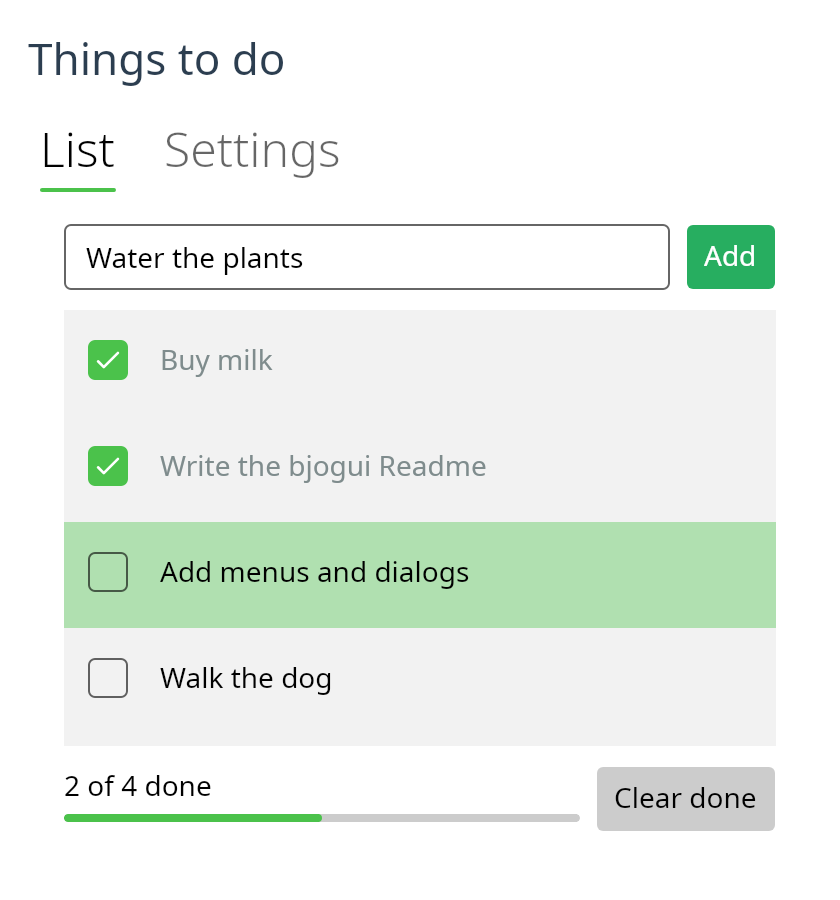
The todo list above is examples/todo.bjo.
(import (bjogui view))
(import (bjogui app))

(type (: Msg (Union Inc Dec)))

(: gui-update (-> Msg int (Tuple int (List (Event Msg)))))
(defun (gui-update msg n)
  (next (match msg (Inc (+ n 1)) (Dec (- n 1)))))

(: view (-> int (View Msg)))
(defun (view n)
  (row #:spacing 8.0 #:margin 16.0
    (button "-" Dec)
    (text #"${n}")
    (button "+" Inc)))

(defun (main)
  (run-app 0 gui-update view #:title "Counter"))
A program never names an Avalonia type. A view is a Bjolang value, an event is a message, and the controls are made and changed by the package.
How it works
An event finds its message in the view its control was last given.
gui-update makes the next model from the message, and view makes the next
view. The next view is compared with the last one, control by control, and
only what differs is changed. So a control keeps its focus, its caret and its
scroll position when the model changes.
Children are matched by key, and those with no key by their place among
the others with none. Give each item of a list that can change order a key
with (keyed id view): a child that moves then keeps its control, and the
control is moved rather than made again. A child whose kind changes gets a
new control.
A control that is changed raises events of its own: a text input whose text is set says that its text changed. Those events come while the controls are being changed, and they are dropped, so only the user's events are messages.
The views: (bjogui view)
| Constructor | Control | Sends |
|---|---|---|
(text s) |
TextBlock |
nothing |
(button label msg) |
Button |
msg on a click |
(text-input value on-input) |
TextBox |
(on-input text) on a change |
(text-area value on-input) |
TextBox, several lines |
(on-input text) |
(checkbox label checked? on-toggle) |
CheckBox |
(on-toggle checked) |
(slider value minimum maximum on-change) |
Slider |
(on-change value) |
(progress-bar value) |
ProgressBar |
nothing |
(dropdown options selected on-select) |
ComboBox |
(on-select index) |
(image path) |
Image |
nothing |
(list-box views selected on-select) |
ListBox |
(on-select index) |
(tabs selected on-select (tab header view) ...) |
TabControl |
(on-select index) |
(column child ...), (row child ...) |
StackPanel |
nothing |
(grid #:columns #:rows child ...) |
Grid |
nothing |
(scroll child) |
ScrollViewer |
nothing |
(border child) |
Border |
nothing |
They take keywords where they apply: #:size (the font size of a text),
#:wrap (a text breaks its lines at its width), #:width, #:height,
#:margin, #:padding, #:spacing (between the children of a column, a row
or a grid), #:enabled, #:placeholder, #:step (a slider's arrow key) and
#:maximum (a progress bar's full, 1 unless told otherwise). A size of zero,
the default, leaves the size to the control.
A grid's #:columns and #:rows are sizes as Avalonia writes them: "Auto"
fits the content, "*" shares what is left, "2*" takes two shares, and a
number is pixels. (at row column view) puts a view in a cell, counting from
0, with #:row-span and #:column-span.
(grid #:columns "Auto,*" #:rows "Auto,Auto" #:spacing 6.0
  (at 0 0 (text "Volume")) (at 0 1 (slider (.volume m) 0.0 10.0 Volume))
  (at 1 0 (text "Colour")) (at 1 1 (dropdown ["red" "green" "blue"] (.colour m) Colour)))

(scroll (apply column (vec->array (vec-map (fun (t) (keyed (.id t) (text (.title t))))
                                           (.todos m))))
        #:height 200.0)
An image that cannot be read shows nothing.
A list box's items are views, so an item can be anything: a text, a row with a checkbox, a dropdown. Give them keys if the list can change order. Each item is a control, so a list of thousands makes thousands of controls.
(tabs (.tab m) Tab
  (tab "Todo" (list-box (vec-map (fun (t) (keyed (.id t) (text (.title t)))) (.todos m))
                        (.chosen m) Chose))
  (tab "Settings" (checkbox "Dark" (.dark m) Dark)))
Colours and borders
(paint view #:colour #:background) colours any view: #:colour is the
text, #:background what is behind it. A colour is a name such as "red",
or "#rgb", "#rrggbb" or "#aarrggbb". The empty string, the default,
leaves the colour to the theme, and so does a colour that cannot be read.
(border child #:colour #:thickness #:radius #:background #:padding) draws
a line around a view, with round corners if #:radius is more than zero.
(border (paint (text "Saved") #:colour "#c0392b")
        #:colour "#2980b9" #:radius 8.0 #:background "#ecf0f1" #:padding 8.0)
The Fluent theme gives a button its own colours when the pointer is over it or it is pressed, so a painted button shows the theme's colour then.
Work: commands and subscriptions
gui-update is a plain function, so it cannot wait, and the compiler says so
if it tries. Work is a value it returns, and the app runs it.
A command is an (Event %m): an event whose answer is a message. (next m
command ...) is the next model and the commands to start; (next m) is the
model alone. The app syncs each command in a fiber of its own and gives its
message to gui-update. Any event will do: a timeout, a blocking call, a
channel, a choose of several.
(Load (next (record-set m (loading #t))
            (wrap (blocking (fun () (file-read-text path))) Loaded)))
A subscription is a source of messages that runs while the model asks for
it. subscriptions gives the list for a model. After each update the app
starts those that are new and cancels those that are gone; the others keep
running. A subscription is known by its key.
(every duration msg)sendsmsgeach timedurationhas passed.(subscription key next-event)is a source of your own:next-eventgives the event of the next message, and is called again after each one.(subscription "jobs" (fun () (wrap (chan-recv jobs) Got)))sends what comes on a channel.
(: subscriptions (-> Model (List (Sub Msg))))
(defun (subscriptions m)
  (if (.running m) (list (every (milliseconds 100) Tick)) '()))
The fibers belong to the app. They post their messages to the UI thread, so
gui-update and view always run there. When the window is closed they are
cancelled, and the program ends.
Running: (bjogui app)
(run-app init gui-update view #:subscriptions #:title #:width #:height)opens a window and runs until it is closed.#:screenshot pathmakesrun-appsave a PNG of the window once it is shown, at twice its size, and close it. It is the environment variableBJOGUI_SCREENSHOTunless the program says otherwise, so any program can be pictured with no change:BJOGUI_SCREENSHOT=docs/todo.png bjo run examples/todo.bjomade the picture above.-
(start-app init gui-update view on-root #:subscriptions)makes the controls with no window, and giveson-rootthe control to show. Its fibers belong to the scope it is started in.app-dispatch!gives a message on the UI thread, andapp-send!from any thread.app-run-pending!runs what fibers have posted, where no loop of Avalonia's does.app-stop!cancels the subscriptions and drops later messages.app-modelreads the model, andapp-control-atfinds a control by its path of child indices.
tests/app.bjoandtests/effects.bjouse these to drive an app through its real controls.
Requirements
- Avalonia 11.3, which
bjorestores from NuGet. On Linux it needs X11 or XWayland. - A Bjolang with
(std interop), which makes the delegates that Avalonia's events take.
Tests
bjo run tests/app.bjo       # prints "bjogui ok"
bjo run tests/effects.bjo   # prints "bjogui effects ok"
bjo run tests/controls.bjo  # prints "bjogui controls ok"
bjo run tests/lists.bjo     # prints "bjogui lists ok"
bjo run examples/counter.bjo
bjo run examples/stopwatch.bjo
bjo run examples/todo.bjo
Not yet
- Menus and dialogs.
- Styles of one's own, with classes, and colours for the pointer-over and pressed states.
- A moved control is taken out of the panel and put back, so it may lose the keyboard focus.