
19 KiB
bjomarks-gui — bookmarks in a window
Bjomarks on the desktop: a window for bjomarks, made with bjogui and drawn with AvaUnion, KDE's look.
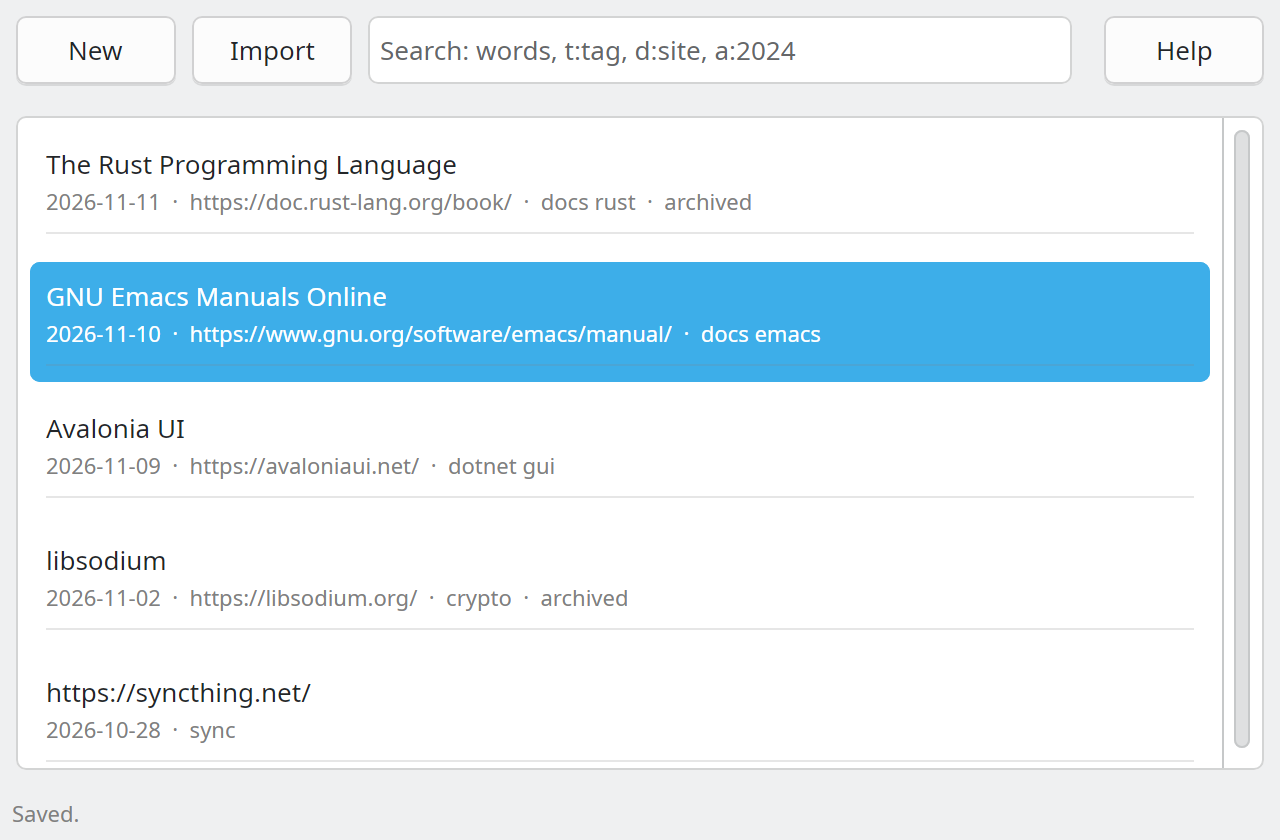
bjo run . [SHARED [LOCAL]]SHAREDis the folder that the devices share, through a file syncer or a mounted WebDAV share: where the vault is. Else$BJOMARKS_SHARED, else the folder chosen on the first screen the last time, else~/Sync/bookmarks. The folders added on the first screen are saved in~/.config/bjomarks/settings.json. The list of them is there only when neitherSHAREDnor$BJOMARKS_SHAREDis given.LOCALis this device's own folder:$BJOMARKS_LOCAL. Else each shared folder has one of its own, inbjomarks/vaultsin the user's data folder (~/.local/share/bjomarks/vaultson Linux), so that two shared folders are two vaults. Seedevice-folderin bjomarks.BJOMARKS_LOOK=fluentdraws the window with Avalonia's Fluent theme instead of AvaUnion.
Using it
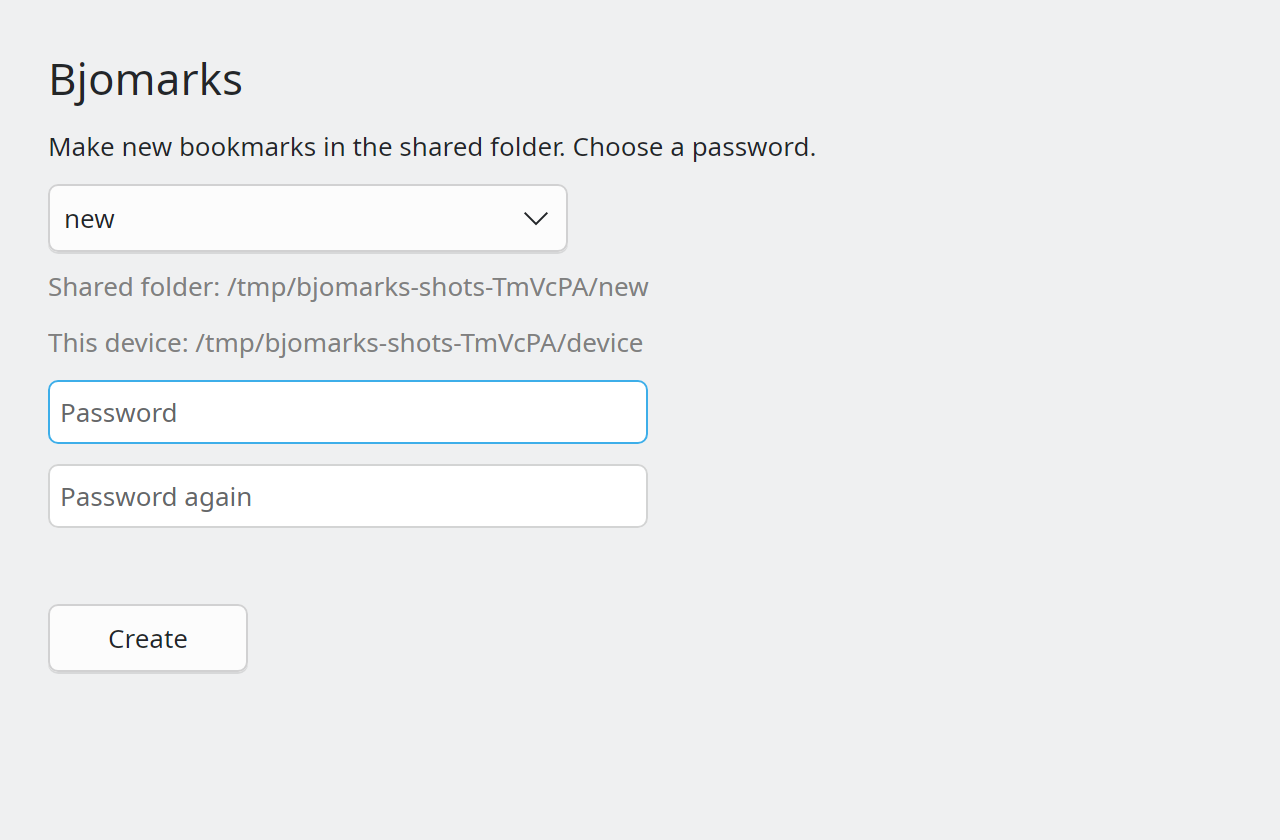
The first screen asks for the password. It opens this device's bookmarks,
joins those in the shared folder when this device has none, or makes new
ones when the shared folder has none: then the password is asked twice.
Argon2id and the first sync run in the background. The password box has
the keyboard when the window opens, and Enter in it opens the vault, or
joins it. For a new vault, Enter in the first box
goes to the second, and Enter in the second makes the vault.
More than one vault. Each shared folder holds bookmarks of their own, with a password of their own, as on Android. The first screen lists the shared folders added, by the names of the folders, and the first screen is the one for the folder chosen:
- Add new…, at the end of the list, asks for a folder. A folder with a vault is joined, and in an empty one a new vault is made.
- Remove from list takes the folder chosen out of the list, when there are others. Its files stay, in the shared folder and on this device: adding the folder again opens its bookmarks again.
- Other bookmarks…, in the toolbar of the open vault, syncs it, closes it, and goes back to the first screen.
- The folder used last is opened at the next start. A folder used at the first start, before any was added, is in the list once it opens.
Each shared folder has a device folder of its own (see device-folder in
bjomarks). With LOCAL or $BJOMARKS_LOCAL given, there is one device
folder, and so one vault: it belongs to the vault it was made or joined
with, and a folder with another vault does not open. An empty folder then
moves the vault there: it opens from this device's files, and its files are
written in the new folder.
| Doing | How |
|---|---|
| Add a bookmark | Ctrl+M, or New in the toolbar |
| Import Firefox's bookmarks | Import, in the toolbar: choose Firefox's JSON backup |
| Edit the chosen bookmark | Ctrl+E, or a right click on it: Edit |
| Open it in the browser | Enter, or a right click on it: Open |
| Open it privately | a right click on it: Open in private window |
| Copy its address | a right click on it: Copy address |
| Remove a bookmark | a right click on it: Remove. No key removes |
| Bring back what was removed | Ctrl+Z: the last removed first, again for the one before |
| Fetch a page's title | Fetch title, beside the title in the dialog |
| Fetch an archive link | Fetch archive, beside the archive link in the dialog |
| Search | type in the search box: the list is filtered as you type |
| Search by tag | t:rust in the search box |
| Clear the search | Escape |
| Go to the search box | Ctrl+S, from anywhere in the window |
| Go to the first bookmark | Ctrl+N in the search box |
| Go to the next one | Ctrl+N in the list |
| Go to the one before | Ctrl+P in the list; on the first, back to the search box |
| Save or cancel the dialog | Enter, Escape, or its buttons |
| Show the help | F1, or Help in the toolbar; Escape closes it |
| Open other bookmarks | Other bookmarks… in the toolbar |
No key is a single letter, so each acts in the search box too. Ctrl+E
and Enter act on the chosen bookmark, and do nothing when none is chosen.
Ctrl+Z in the search box brings back a bookmark when a removal (or the
bringing back of one) is the last thing done; after you type in the box, it
undoes the typing, as in any text box. So Ctrl+Z works at once after a
removal of the last bookmark that the list shows, when the keyboard goes to
the search box.
The help is a window of its own, with the keys and a few words on searching, the dialog and importing:
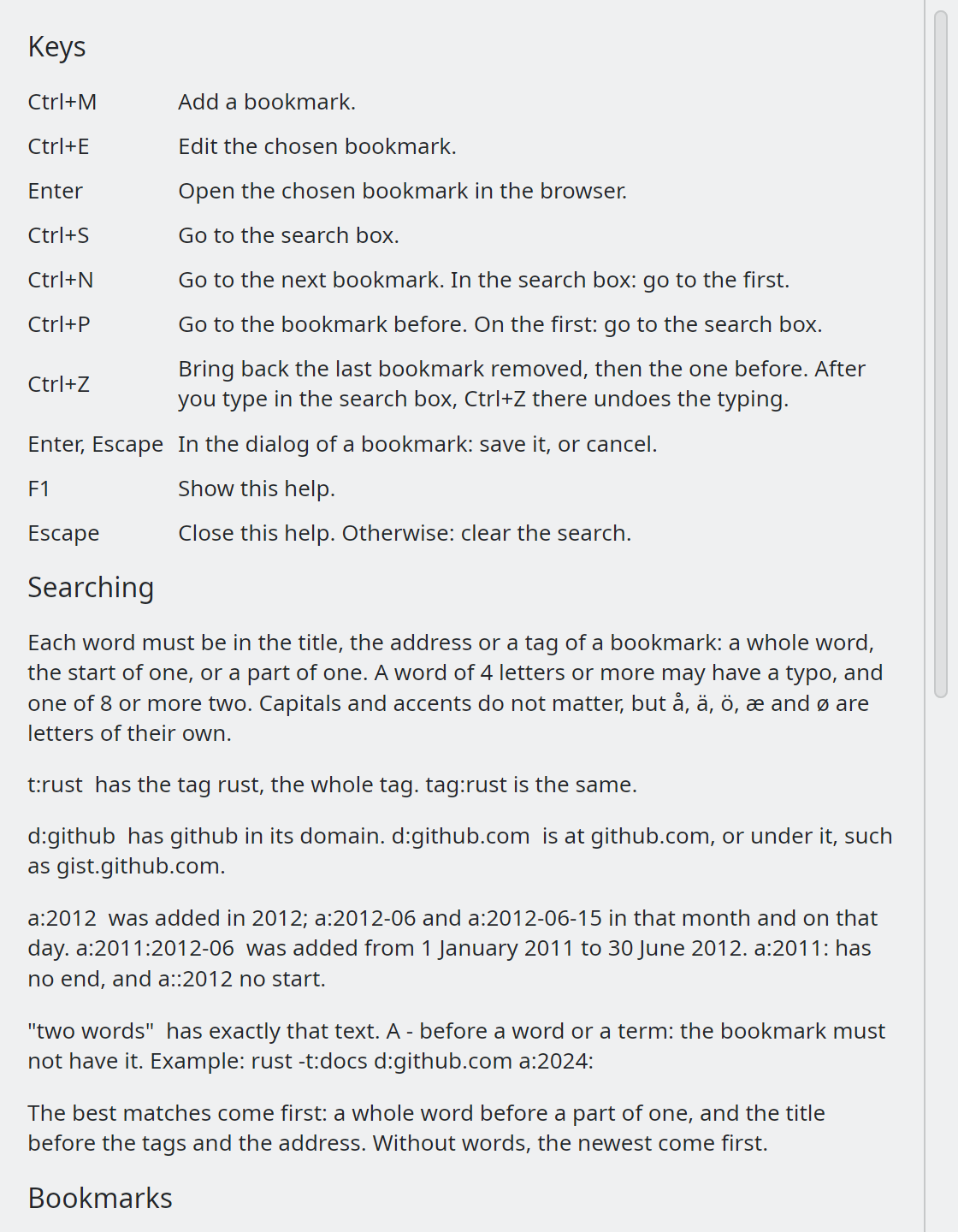
The search shows a bookmark when each word of it is in the bookmark's
title, its address or its tags, as a word, the start or a part of one, or
with a typo: rust book finds The Rust Programming Language at
https://doc.rust-lang.org/book/. t:rust is the tag "rust", the whole
tag; d:github.com the domain; a:2011:2012-06 the days added; "two
words" exact text; and - before any of them excludes it. The best matches
come first. Archive links are not searched. All of it is in (bjomarks
search), and in the help (F1).
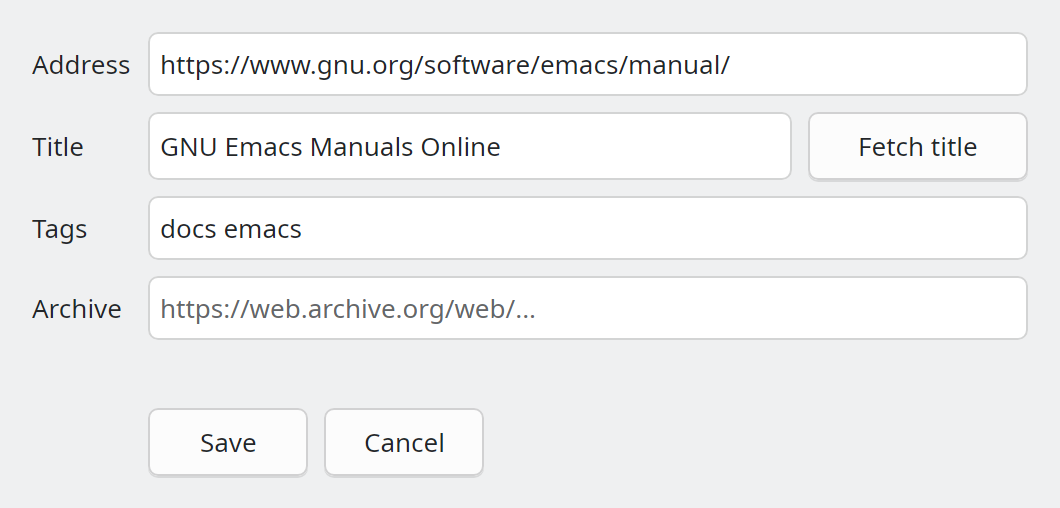
Titles. The list shows a bookmark's title, or its address when it has none. The line under it is as on Android: the day it was added, the address, the tags, and "archived" when it has an archive link. A thin line is between the bookmarks. Fetch title, beside the title in the dialog, fetches the page at the address and puts its title in the field, to keep or change before Save. While it fetches, the button turns:
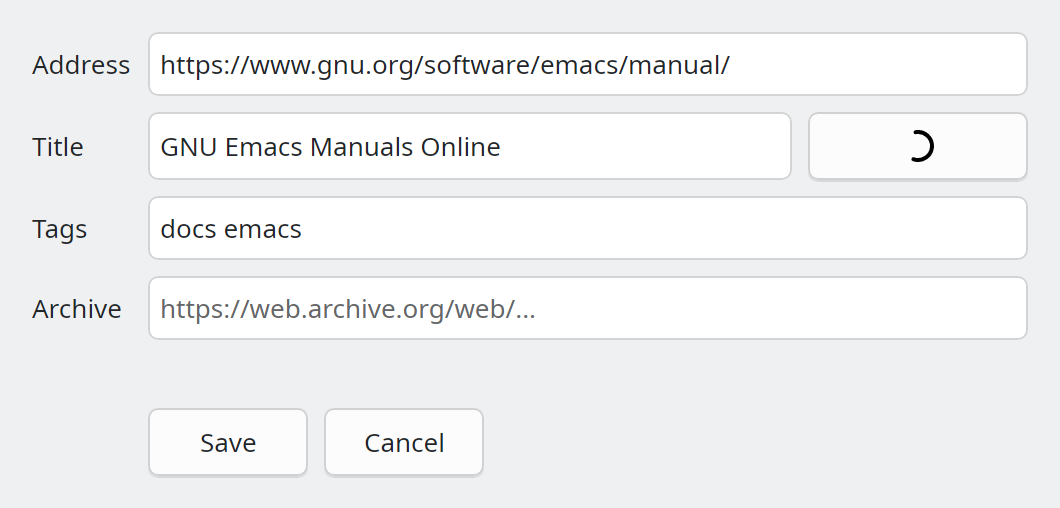
Nothing else fetches a title: not saving, not opening, not syncing. When
the page has no title, or cannot be fetched, the dialog says why. Typing in
the address or the title while a fetch runs stops waiting for it, and
closing the dialog drops it. (bjomarks title) does the fetch: only
http and https, at most 512 KiB, 10 seconds. A fetch tells the site
about the bookmark: the site sees a request from this machine.
Archive links. Fetch archive, beside the archive link in the dialog,
asks the Wayback Machine of the Internet Archive for the latest snapshot of
the page at the address, and puts the snapshot's address in the field, as
https://web.archive.org/web/<time>/<address>. The button turns while it
looks, as Fetch title does, and the two can run at the same time. When
the Wayback Machine has no snapshot of the page, or does not answer, the
dialog says why, and the field keeps what it had. Typing in the address or
the archive link while a lookup runs stops waiting for it, and closing the
dialog drops it. (bjomarks wayback) does the lookup, with the
availability API (https://archive.org/wayback/available): only http and
https addresses, 20 seconds. A lookup tells the Internet Archive the
address of the bookmark; the page itself is not fetched. The button does
not make a new snapshot.
No address twice. When the address typed or pasted in the dialog of a
New bookmark is one that a bookmark has, the dialog becomes the Edit
dialog of that bookmark, with its title, tags and archive link, and says
so. Save then changes that bookmark, and adds none. When the address
changes again to one that no bookmark has, as while
https://example.org/page is typed past https://example.org/, the dialog
is of a new bookmark again, with what was typed in it before. Addresses are
the same when they are the same text, but for spaces at the ends: / at
the end, and the case of the scheme and the host, count. The Edit dialog
of a bookmark does not check.
Importing from Firefox. Import reads the JSON backup that Firefox
writes: in Firefox's Library window (Ctrl+Shift+O), choose Import and
Backup, then Backup…. It is named bookmarks-YYYY-MM-DD.json. The HTML
export is not read: the note says so, and which file to choose.
- Each folder that holds a bookmark becomes a tag of it, at any depth:
Rust Docs →
rust-docs. Firefox's top folders (the menu, the toolbar, Other bookmarks, Mobile bookmarks) do not. Firefox's tags come too. Names are lower-cased, with-for spaces and commas. - A bookmark keeps its title and the date it was added in Firefox.
- An address bookmarked in two folders is one bookmark with both tags.
- Addresses that are not http or https (Firefox's
place:queries, bookmarklets,about:pages) are left out. So is an http address that is not a URL by RFC 3986, as one with two#in it: the note names it. - An address that is here already is not imported again, and the bookmark here is not changed. So the same backup can be imported again, or a newer one, and only what is new comes.
- The note at the bottom says how many came in, and what was left out. There is no undo for an import.
Tags are typed with spaces or commas between them, and kept sorted, each
once. The address and the archive link must be absolute URLs, with a
scheme: https://....
Removing does not ask: Ctrl+Z brings the bookmark back as it was,
also after the removal was synced. The list of what was removed lasts until
the window is closed. A bookmark brought back is a change like any other,
so it comes back on the other devices too.
Opening gives the address to the system, which opens it in the browser
the user chose: xdg-open on Linux, open on macOS, the shell on Windows.
With BJOMARKS_BROWSER set, that program is started with the address as
its one argument instead. Only http and https addresses are opened: a
bookmark can come from another device's file, and a file: address, or one
of a program's own scheme, could start a program on this one.
Open in private window starts the default browser with its flag for a
private window: --private-window for Firefox and those made from it
(LibreWolf, Waterfox, Floorp, Zen), --incognito for Chrome, Chromium,
Brave, Vivaldi and Opera, and --inprivate for Edge. The default browser
is the one xdg-settings get default-web-browser names (in a distrobox
container, the host's), and its command is the Exec line of its
.desktop file, so a Flatpak browser is started with flatpak run as its
file says. BJOMARKS_PRIVATE_BROWSER names a program to start instead,
with the address as its one argument, such as a script that runs
firefox --private-window "$1". With a browser not known, or on Windows and macOS, the
address is copied, to paste in a private window, and the line at the
bottom says so. Only http and https addresses are opened, as for Open.
A page bookmarked twice, by two devices before they synced, becomes one bookmark, with the tags of both (see (bjomarks duplicates)). When the two have different titles, a window asks which to keep; Not now, or closing it, asks again the next time the vault opens.
In a distrobox container, the address is opened in the host's browser:
host-spawn -no-pty -env DISPLAY,WAYLAND_DISPLAY,XDG_SESSION_TYPE xdg-open
ADDRESS
. distrobox's own xdg-open in the container gives the host's
xdg-open none of these variables, and with no display it finds no
browser: "no method available". XDG_CURRENT_DESKTOP is not given on
purpose: with it, xdg-open uses the desktop's own opener, which needs more
of the session (KDE's needs KDE_SESSION_VERSION, or it tries kfmclient).
Without it, xdg-open opens the address with the user's default program for
it, as xdg-mime says, on any desktop. The window knows it runs in such a
container when podman's or docker's file for it is there
(/run/.containerenv, /.dockerenv) and host-spawn is on the PATH.
The opener is waited for, up to 5 seconds. When it ends with an error, the line at the bottom says so ("xdg-open found no program to open it with"), and not "Opened". One that runs longer has started a browser that it waits for, and that is no error.
Saving
Each change (a new bookmark, an edit, a removal) starts a sync in the
background: this device's file is written to the shared folder, and the
other devices' files are merged in. The window does not wait for it. A
change made while a sync runs is merged with what that sync did
(vault-merge), and the next sync writes it. A sync also runs each minute,
for the other devices' changes. The line at the bottom says how the last
one went.
Closing the window waits for the sync of the last changes. If that sync fails, the window says so and stays open; closing it again closes it without saving.
The parts
| Module | What it has |
|---|---|
(bjomarks-gui app) |
the model, the update, the views, the dialog and the keys |
(bjomarks-gui inputs) |
the search box and the password box: Avalonia ~TextBox~es |
(bjomarks-gui fetch-button) |
the buttons that fetch a title and an archive link, which turn while they work |
(bjomarks-gui settings) |
~/.config/bjomarks/settings.json: the shared folders added, and the one used last |
(bjomarks-gui browser) |
opens an address in the browser, or in a private window |
src/main.bjo |
the folders, the theme, and run-app |
bjogui has no animations, so Fetch title and Fetch archive are Avalonia Button~s, made
with ~(bjogui native). Over its label is an Arc, hidden until a fetch
runs. Then the label goes, and the arc goes round once in 0.9 s while it
grows and shrinks in 1.6 s, in the colour of the button's text. The two
animations are Avalonia's, in a style of the arc that applies while it has
the class spinning: they run on Avalonia's render loop, not as messages
to the model, and only while a fetch runs.
The search box and the password box are made with (bjogui native), not
text-input. The search box must hear Ctrl+N itself: only the box knows
that it has the keyboard, and Ctrl+N means "the first bookmark" there and
"the next one" in the list. It hears the key as it tunnels down, before the
box's own handling. The password box shows dots, and hears Enter.
The window's Ctrl+N and Ctrl+P are run-app's #:keys: they come to
the window when the control with the keyboard does not take them. (focus
"list") gives the keyboard to the chosen bookmark, as bjogui's focus does
for a list box.
Tests
bjo run tests/app.bjo                              # prints "bjomarks-gui ok"
bjo run tests/screenshots.bjo docs/window.png              # needs a display
bjo run tests/screenshots.bjo /tmp/edit.png edit           # the dialog is /tmp/edit-draft.png: docs/edit.png
bjo run tests/screenshots.bjo /tmp/fetching.png fetching   # /tmp/fetching-draft.png: docs/fetching.png
bjo run tests/screenshots.bjo /tmp/help.png help           # /tmp/help-help.png: docs/help.png
bjo run tests/screenshots.bjo docs/unlock.png lock
tests/app.bjo runs the window with no screen, in Avalonia's headless
platform, and presses keys with its keyboard, so that they go where real
keys go: Ctrl+N and Ctrl+P in the search box and in the list, text typed
into the search box, Enter and Escape in the dialog and in the password
box, Ctrl+M, Ctrl+E, Enter, Ctrl+S, Ctrl+Z and F1 in the list
and in the search box, and the letters E, O and D, which do nothing there
and are typed in the search box. It checks that the help names each key of
the window and of the dialog. It makes
a vault, adds, searches, edits, opens, removes and brings back bookmarks,
waits for the background syncs, opens the vault again with a wrong and a
right password, and joins it from a second device. Opening starts no
browser: the test sets BJOMARKS_BROWSER to a script that writes down the
address, and on Linux puts a fake xdg-open first on the PATH.
Titles are fetched from a server that the test runs on the loopback: no
site on the internet is asked. The test clicks Fetch title in the
dialog, as the button hears a click, and checks the button while a slow
page is fetched: the label hidden, the arc shown, with the class
spinning, and at another angle after a tick of the render loop. It
checks that saving fetches nothing, that the server was asked once per
click, that a page with no title is said so, and that a result is dropped
when the dialog was closed or a title was typed meanwhile. The server also
answers as the Wayback Machine's API does: the app is given its address in
place of the Internet Archive's. The test clicks Fetch archive, and checks
the same for the archive link, and that a link fetched for a bookmark is
saved with it. The search tests include tag:mytag tag:nice banana.
The import and the folder are tested with the messages that the pickers
send, as a picker answers nothing with no screen. The import reads a
made-up backup in Firefox's shape, twice, then an HTML export and a file
that is not there. The folder test keeps its settings in the temp
directory, not in ~/.config: it changes the folder of a device with no
vault (to an empty one, then back), chooses from the list of folders and
removes one from it, checks what is saved, that settings of an earlier
version are read, and that other fields of the settings are kept, and
opens a device's vault in a new empty folder. There another device
bookmarks a page of it with another title: the test checks the question
of which title to keep, Not now, and the title chosen. Then Other
bookmarks… closes the vault, and it opens again.
Open in private window is tested by its parts: the flag of each browser,
the words of Exec lines (Flatpak's, and quoted ones), and the note and
the copy when no browser opens one. The test starts no browser. Escape
clearing the search, Copy address and the line under each bookmark are
tested too.
Not tested by a test: the right click itself, a real mouse on the buttons, the pickers themselves, and a real browser's private window. The test checks that each bookmark has a menu with Open, Open in private window, Copy address, Edit and Remove, and bjogui's tests check that a context menu is its control's and that its items send their messages.
Not yet
- The list makes a control for each bookmark it shows. A few thousand are fine; far more would want a list that makes controls only for what is on screen, which bjogui does not have yet.
- No way to change the password from the window, or to choose this
device's own folder (
LOCAL). - No undo for an import, and no import of the HTML export or of other browsers' bookmarks.
- WebDAV, as bjomarks has no WebDAV storage yet. A WebDAV share mounted as a folder works.